

Pansod: A €10 Way to Publish a 360° Virtual Tour and Embed It Anywhere
Pansod is a browser-based spatial storytelling tool from LABVR: upload panoramas, place hotspots, link scenes, publish, embed. No subscription — one tour is a one-off €10 for the year. Here is what it does, how the pricing stacks, and what to check before you commit.
Pansod sells one idea and sells it narrowly: take the 360° panoramas you already shot, turn them into a navigable virtual tour in a browser, and get an iframe you can paste into any site. No desktop software, no plugin, no monthly bill. It is built by LABVR, the viewport runs on Three.js, and the whole pitch on the landing page is “immersive spatial storytelling made simple.” That is a crowded promise, so this post takes it apart: what the tool actually gives you, how the money works, and where the edges are.
What it is: a Three.js viewport with a scene graph on top
A Pansod tour is a set of 360° panoramas — Pansod calls them scenes — with links between them. You upload the equirectangular images, the editor renders each one in a real-time Three.js viewport, and you place hotspots on the sphere. A hotspot either reveals information or jumps to another scene, and scene-to-scene moves use a fade transition rather than a hard cut, which is the difference between a tour that feels like a space and one that feels like a slideshow.
The placement mechanism is the piece worth naming. Pansod uses what it calls a detached reticle: you click to place, drag to position, and the hotspot is stored in yaw/pitch — spherical coordinates — rather than as a 2D offset on the flat image. That is why the marketing line says hotspots feel “locked in 3D space.” It also means a hotspot stays put when the viewer rotates, zooms, or looks at the same tour on a phone in a completely different aspect ratio.
On the viewer side: full touch controls, gyroscope look on mobile, responsive layouts, and WebXR so a Quest headset or a phone in a cardboard holder gets a genuine stereo view instead of a pannable rectangle.
The workflow, end to end
- Pick a template or start empty. Pansod ships six starter spaces — Modern Apartment, Industrial Loft, Penthouse View, Mountain Villa, Art Gallery, Cyber Coffee Shop — grouped by real estate, architecture, luxury, travel, creative and hospitality, and you swap their panoramas for your own.
- Upload your panoramas. Each one becomes a scene. The image count is what your plan meters, not the number of tours you edit — 5 on the free tier, 10 on the paid one.
- Place hotspots. Click to drop, drag to position, link each one to a target scene.
- Publish. You get a shareable link immediately — Pansod hosts the tour, so there is nothing to deploy.
- Embed. Copy the iframe into WordPress, Webflow, a plain CMS, or a React app. No plugin on either side.
- A scene
- one 360° panoramaEach equirectangular image you upload becomes one scene, rendered on the inside of a sphere in the Three.js viewport. Your plan meters these, not tours: 5 free, 10 on the €10 plan.
- A hotspot
- yaw + pitchClick to place, drag to position. Stored as spherical coordinates rather than a 2D offset, so it stays anchored to the same spot in the room at any zoom, rotation or screen size.
- The target scene
- Following a hotspot cross-fades into the linked scene rather than cutting. Scenes can link both ways and to more than one neighbour, so a tour is a graph, not a slideshow.
- More scenes
- There is no fixed path through a tour. Link whichever rooms are actually adjacent and the viewer walks the space in whatever order they choose.
- Publish
- 12 monthsPansod hosts the tour and gives you a shareable link in seconds. The €10 base plan keeps it live for a year with no watermark; the free tier never expires but stamps a watermark on the viewer.
- Your page
- The embed is the point: one iframe into WordPress, Webflow, any CMS or a React app, with no plugin at either end. The tour lives on the page that ranks and converts, not just on a link you send.
- The iframe
- Test this first, not the editor — drop it into the real page template on a real phone and check load time, narrow-width layout, and whether your CMS strips iframes.
Embedding is the actual product
It is easy to read “one-click iframe embedding” as a checkbox feature. It is not — for most of the people Pansod is aimed at, it is the whole reason to use a hosted tool instead of a Matterport-style capture service or a self-hosted Pannellum setup. A tour that only exists on someone else's domain is a link you send. A tour that sits inside your own property listing, your own venue page, your own exhibition write-up is a page that ranks, converts, and stays yours when the vendor relationship ends.
The practical consequence: the thing to test first is not the editor, it is the embed. Drop it into the actual page template you intend to use, on an actual phone, and check the load time, the layout at narrow widths, and whether your CMS strips iframes.
Pricing: one tour, one price, stackable add-ons
There is no subscription. The base plan is €10 for one hosted tour, active for 12 months, with 10 panoramic images, iframe embedding, no watermark, and hosting on Pansod. Two add-ons are listed as coming soon: an extra year at €6, and a +10 images pack at €6, both stackable and both applied per tour. The free plan stays available with no expiry — 1 tour, 5 images, and a Pansod watermark.
Show the 4 numbers behind this chart
| Category | Total cost (€) |
|---|---|
| 1 year | 10 |
| 2 years | 16 |
| 3 years | 22 |
| 5 years | 34 |
Who it fits
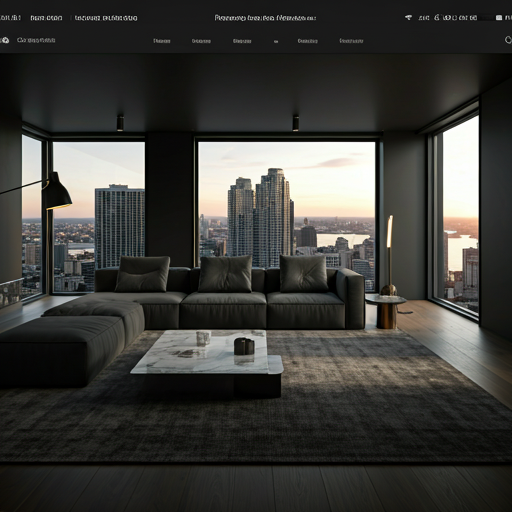
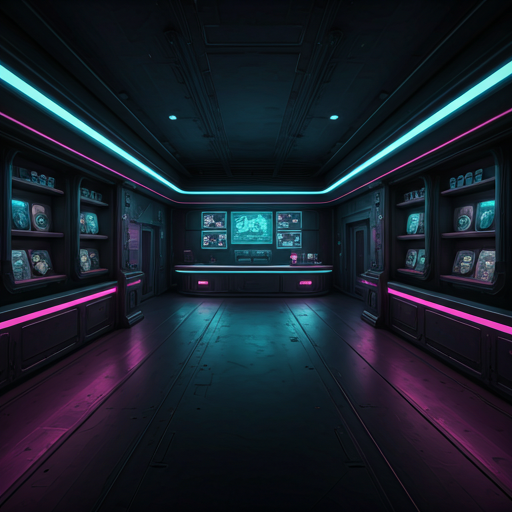
Three of the six starter templates, and roughly the three audiences the tool is shaped for: Modern Apartment, Cyber Coffee Shop, Art Gallery.
What to check before you commit
- The 12-month clock. The base plan buys a year of hosting, not permanent hosting. If a tour needs to outlive that, the extra-year add-on is the mechanism — and it is still marked coming soon, so ask what happens at month 13 before you embed a tour on a page that matters.
- The image budget. Ten panoramas is a generous apartment and a tight hotel. Count your scenes before you pay, because the +10 pack is the other add-on that has not shipped yet.
- Your own panoramas. Pansod renders what you give it. A tour is only as good as the equirectangular source — exposure consistency between rooms, a clean nadir, and a tripod that is not in every shot matter more than any editor feature.
- What is not published. The site says nothing about analytics, custom domains, team seats, floor-plan navigation, or an export path if you want to take a tour elsewhere. Absence on a marketing site is not proof of absence in the product, but they are the four questions worth asking support first.
The editor sits behind a login, so everything above comes from what Pansod publishes about itself rather than from a hands-on build — worth saying plainly. The free tier costs nothing and has no expiry, which makes the honest next step obvious: upload one panorama, place one hotspot, embed the result in your real page template, and judge it there. Start at pansod.com or go straight to the pricing calculator.