
Grok Bot and Cursor Explained: Features, Plans and How They Work
Grok Bot is a persistent cloud-computer agent; Cursor is an AI coding environment. Here is how they differ, overlap and what each plan actually unlocks.

Grok Bot and Cursor now appear in the same product story, but they solve different problems. Cursor is an AI coding environment for building software. Grok Bot is a broader digital worker that receives its own cloud computer and operates websites, apps, files and terminal tools on your behalf.
Grok Bot in one minute
Grok Bot is a system of persistent, named AI teammates. Instead of returning only an answer or a draft, each Bot can use a browser, filesystem and terminal on a cloud computer to carry a job through several steps. You message it as you would message a colleague: describe the outcome, provide the relevant context, connect the tools it needs and define where it must stop for approval.
This is different from the regular Grok chatbot on grok.com or X. It is also unrelated to the “GrokBot” web-crawler name. In the new product, a Bot means one persistent agent with a role, memory and workspace.
How Grok Bot works
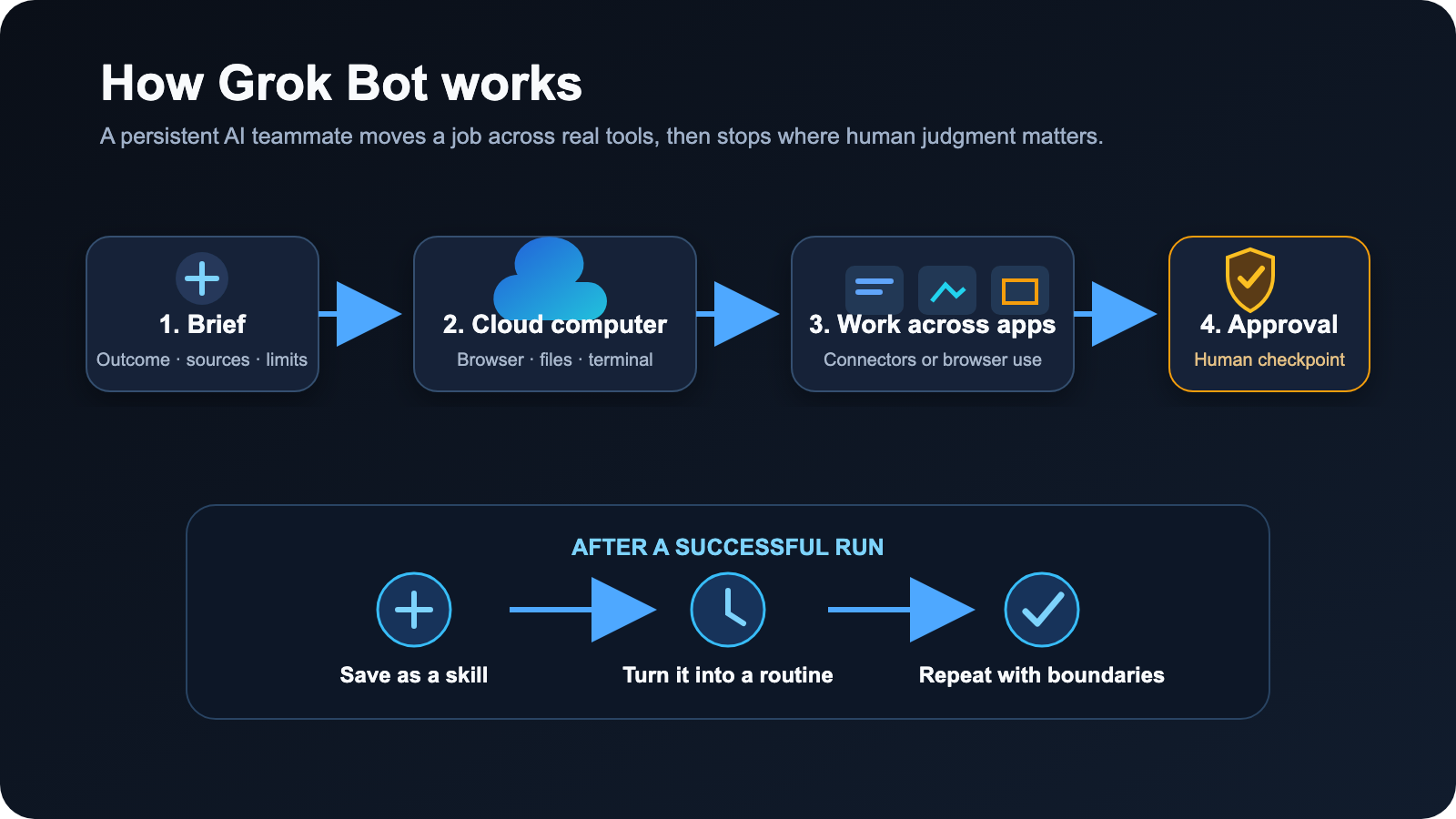
1. You create a role, not just a chat
A Bot gets a name, a primary job and instructions for how that job should be done. A product-performance Bot might investigate incidents and preserve screenshots; a sales Bot might research accounts and prepare outreach without sending it. Narrow roles are useful because their context and preferences improve over time.
2. It works on a persistent cloud computer
All Bots on one account share a cloud virtual machine with files, browser sessions and app logins. Each Bot receives its own screen, so several can work in parallel, but those screens are not separate security boundaries. The cloud computer keeps running when the desktop app, phone or laptop is closed.
3. It combines structured connections with computer use
When a connector or MCP integration exists, the Bot can use that structured route. For tools without a clean integration, it can operate the website through its browser. It can also work with files and terminal commands, allowing one task to move from research to analysis to a finished deliverable.
4. You handle sensitive checkpoints
Passwords, passkeys, two-factor codes, CAPTCHAs and payment confirmations are designed for a human takeover. The Bot can navigate to the checkpoint, hand you control and resume afterward. Actions such as sending, publishing, deleting, purchasing or changing production systems should remain behind explicit approval rules.
5. Successful work can become repeatable
A skill records how a task should be performed. A routine assigns that workflow to a Bot and runs it on demand, on a schedule or after a supported event. The “Teach a task” feature can turn a recorded browser demonstration into a draft skill, though xAI says availability is rolling out and recordings are limited to ten minutes.
The main Grok Bot features
- Persistent state: named Bots can retain role context, preferences, files and summaries of earlier work.
- Background execution: a task or routine continues in the cloud when your device is closed.
- Browser, filesystem and terminal: the Bot can work inside real tools instead of returning instructions for you to follow.
- Multiple Bots: specialized teammates can run in parallel, message one another and hand off ownership.
- Connectors and MCP: supported services can be accessed through more reliable structured integrations.
- Skills and routines: a corrected workflow can be saved and repeated later.
- Human approvals: sensitive or consequential actions can stop for review, with narrow allow or deny rules.
- Cross-device access: the same Bots and conversations sync between the desktop apps and iPhone.
Which plans include Grok Bot?
At its August 2026 launch, the official Grok Bot setup guide lists three eligible plans: SuperGrok Heavy, Cursor Ultra and Cursor Teams Premium. The regular Grok Free, SuperGrok and SuperGrok Plus plans are not listed as eligible. Neither are Cursor Hobby, Pro, Pro+ or Teams Standard.
- SuperGrok Heavy: commonly listed at $300 per month for an individual. Regional offers and checkout promotions may change the amount.
- Cursor Ultra: $200 per month for an individual.
- Cursor Teams Premium: $120 per user per month on monthly billing; annual billing may reduce the effective monthly price.
Grok Bot subscriptions include a weekly usage allowance. Eligible accounts can add on-demand usage billed according to model and token cost. The official FAQ says availability and required plans may vary by account or organization, while team and enterprise access is still rolling out.
What is Cursor?
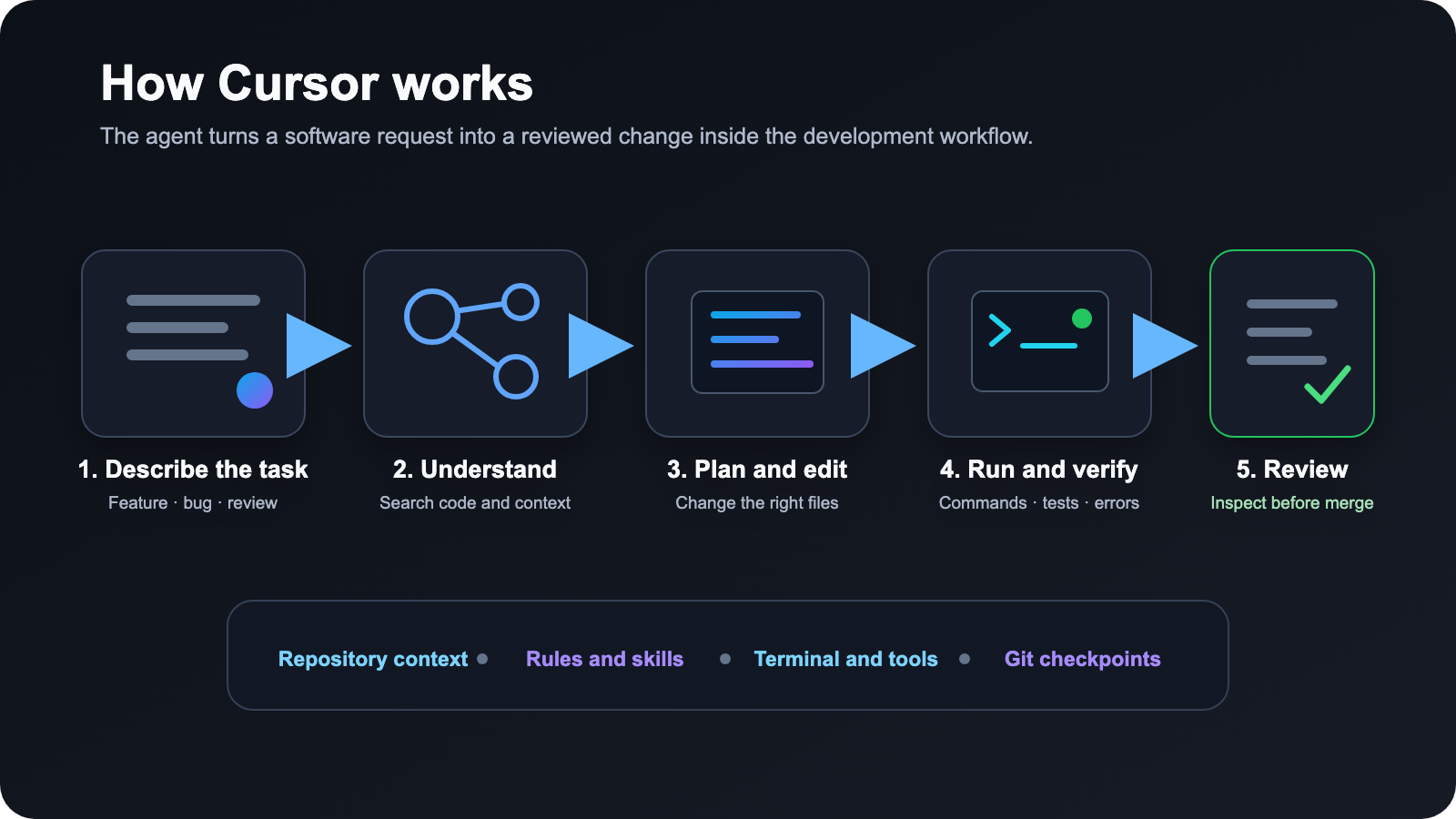
Cursor is an AI coding editor and software agent. It understands a repository, answers questions about it, plans features, edits multiple files, runs terminal commands, fixes errors, reviews changes and helps move work toward a tested pull request. Its interface is familiar to developers because it combines a code editor with agentic workflows.
Cursor can use several frontier models, including Grok models, as well as its own Composer models and models from other providers. The model is the reasoning engine; Cursor is the surrounding system that supplies codebase context, editing tools, terminal access, checkpoints, rules and review surfaces.
How Cursor works
Local editing and fast assistance
Cursor Tab predicts the next edit, while inline editing lets you select code and describe a change. These features are best for tight feedback loops where you remain in the editor and review each suggestion.
Agent mode for larger tasks
For a feature or bug, Cursor’s Agent can search the codebase, build a plan, edit files, run commands, inspect errors and iterate. It can use web and documentation context, images and direct references to files or symbols. Git checkpoints make it easier to inspect or reverse a change.
Cloud agents and multiple surfaces
Longer jobs can run as cloud agents and return changes for review. Cursor also spans desktop, CLI, web and mobile, with integrations for services such as GitHub, Slack, Linear and several development platforms. Subagents can explore parts of a problem in parallel.
Rules and extensions
Teams can encode conventions with rules, add repeatable knowledge through skills, connect external tools through MCP and install plugins. Hooks provide another way to enforce workflow behavior around agent actions.
Cursor’s main features
- Codebase understanding and fast repository search.
- AI autocomplete that can predict multi-line and multi-file edits.
- Natural-language planning, implementation, debugging and code review.
- File editing, terminal commands, tests, web search and documentation lookup.
- Choice of several AI models, with automatic routing available for some workflows.
- Cloud agents, parallel subagents and access from desktop, CLI, web and mobile.
- Git checkpoints, review tools and Bugbot-assisted pull-request review.
- Rules, skills, hooks, plugins and MCP integrations for customization.
Cursor plans at a glance
The current Cursor pricing page lists Hobby at $0, Pro at $20 per month, Pro+ at $60 per month and Ultra at $200 per month for individuals. Team pricing starts with Standard at $40 per user per month, while Teams Premium is $120 per user per month. Enterprise pricing is custom. Taxes, annual discounts, local pricing and usage allowances can change the final cost.
Hobby is suitable for trying limited Agent requests and completion. Pro targets regular individual use. Pro+ increases included model usage for daily Agent users. Ultra is the power-user tier and is the first individual Cursor plan that includes Grok Bot. Team plans add centralized billing, administration, privacy controls, SSO, shared context and usage analytics; Premium raises usage and unlocks Grok Bot.
Grok Bot vs Cursor: the practical difference
- Primary workspace — Grok Bot works across business apps and websites; Cursor works primarily across a software codebase and development tools.
- Default result — Grok Bot aims to finish an operational outcome; Cursor aims to produce a reviewed software change.
- Persistence — Grok Bot keeps a durable cloud computer, browser sessions and role memory; Cursor commonly works through local or task-specific cloud development environments.
- Automation — Grok Bot turns demonstrated workflows into skills and scheduled routines; Cursor automates engineering through agents, rules, hooks, plugins and repository instructions.
- Model choice — Cursor exposes multiple coding models. Grok Bot is presented as a managed teammate, so the user focuses on the task rather than selecting a model for every turn.
- Best fit — Grok Bot suits cross-tool operational work; Cursor suits developers who need to understand, modify, test and review software.
What Grok Bot could realistically do
- Research accounts across a CRM and the web, rank the best prospects and prepare outreach drafts for approval.
- Collect campaign numbers from advertising and analytics tools, compare them with a budget and draft a team update.
- Reconcile expenses with receipts and policy documents, flag exceptions and prepare follow-up messages.
- Reproduce a bug in staging, capture screenshots and console evidence, then prepare a complete issue report.
- Review approved inboxes, calendars and team channels to produce a source-linked daily briefing.
The limits and risks matter
Grok Bot is powerful precisely because it can see and act inside real systems. That raises the cost of a mistake. All of a user’s Bots share the same computer, files, browser sessions and credentials, so creating separate Bots does not isolate access. Start with read-only research and draft outputs, connect only the tools required for the role and keep sending, publishing, purchasing, deletion and production changes behind approval.
The product also requires cloud data storage and does not support Cursor’s Legacy Privacy Mode. Training opt-out and data-sharing choices follow the applicable Cursor account settings. The security guide recommends that users enter passwords and one-time codes themselves, remove sensitive files when work is finished and revoke connectors that are no longer needed.
Platform support is limited at launch: macOS on Apple silicon or Intel, Windows on x64 or Arm64 and iPhone on iOS 18 or later are supported. Linux desktop, Android, iPad and a browser-only Grok Bot interface are not officially supported initially.
Which one should you use?
Choose Cursor first if you write software and want AI close to the repository, terminal, tests and pull-request workflow. Most developers should start with Hobby or Pro, then move up only when measured usage or cloud-agent demand justifies it.
Consider Grok Bot if you have a repeatable, valuable workflow that crosses several tools and already costs enough human time to justify a $200–$300 monthly entry point. The best first pilot is a read-and-prepare task with a clear deliverable and an approval checkpoint—not unsupervised access to payments, customer messaging or production systems.
Sources and update note
This guide was researched and updated on August 13, 2026 using the official Grok Bot overview, setup guide, FAQ, security documentation, Cursor product page and Cursor pricing page. Plan eligibility, limits and prices can change quickly, so verify the checkout page before subscribing.